Showing posts with label Jmeter. Show all posts

Wednesday, June 30, 2021

Jmeter - incrementing user defined variables for use

I found a post from five years ago I never published, here it is!   Looks like the immediate minor version after I tested this (Jmeter 3.1), the recommendation was to switch from BeanShell lightweight scripting for java to groovy scripting.  

I had used JMeter to perform tests where the username would change based on the number of times I wanted the test case to be run.  I had five test users on my system (user1, user2, user3, user4, user5) and needed to increment the user being used for each call for variability.

Environment:
Jmeter 3.0
java version "1.8.0_66"
Windows 7

Steps:
Set Jmeter user-defined variables to start off with:
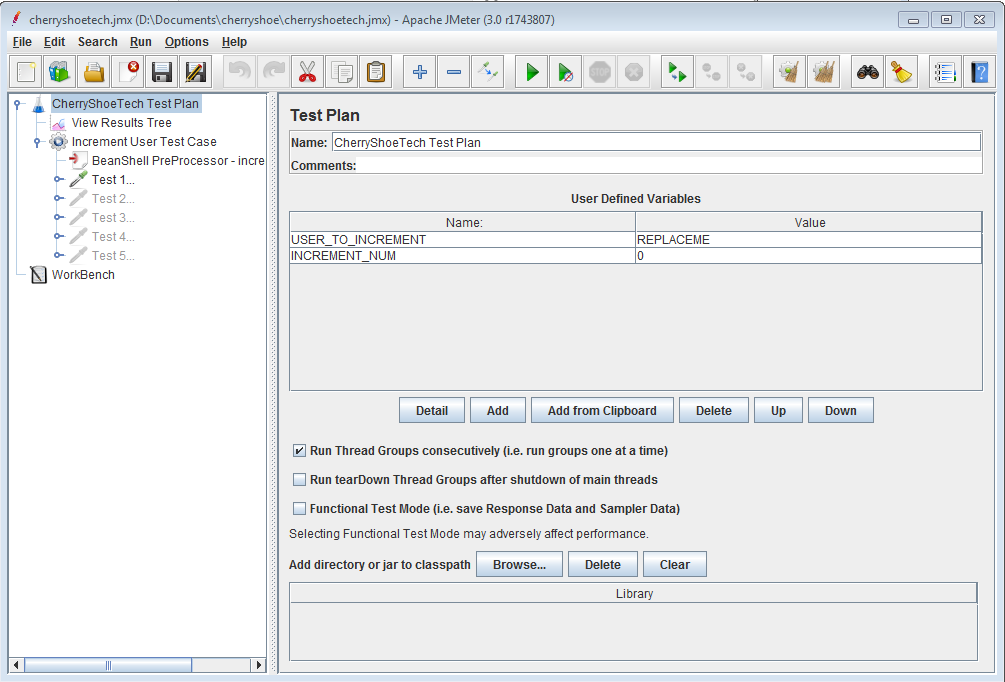

Use Jmeter's Bean Shell Pre Processor to set and increment two user-defined variables USER_TO_INCREMENT and INCREMENT_NUM.  The script:
- grabs the current value of INCREMENT_NUM, which at the start is 0
- checks if the INCREMENT_NUM value is less than 5, if so will increment the value by 1, else will reset the number to 1
- saves the new USER_TO_INCREMENT and INCREMENT_NUM values to the user-defined variables


Now, for subsequent HTTP calls the USER_TO_INCREMENT and INCREMENT_NUM variables will be used.

Saturday, July 23, 2016

JMeter - Parsing REST API JSON Response Data for Subsequent HTTP Requests

I used JMeter recently to do performance testing on a REST API backend application that returns JSON data.  We needed to retrieve the id of the created object to use in subsequent HTTP calls.  This is one way to do it:

Environment:
Jmeter 2.12
java version "1.8.0_66"
Windows 7

The example steps below will use the following JSON response data
[
{
"id" : 88
}, {
"id" : 99
}
]

Steps:
  1. Grab the minimal-json jar from maven central here:
    https://mvnrepository.com/artifact/com.eclipsesource.minimal-json/minimal-json/0.9.1
  2. Put the minimal-json-0.9.1.jar file in your <jemeter_home>/lib folder and restart jmeter
  3. Use Jmeter's Bean Shell Post Processor to parse the JSON response data:

    To retrieve the first id in the JsonArray, put this in the Script section:
    import com.eclipsesource.json.JsonArray;
    import com.eclipsesource.json.JsonObject;
    
    String jsonString = prev.getResponseDataAsString();
    
    JsonArray jsonArray = JsonArray.readFrom(jsonString);
    JsonObject jsonObject = jsonArray.get(0).asObject();
    
    int id = jsonObject.get("id").asInt();
    log.info("*****************id" + id);
    
    // Set the Test Plan's user defined variable named SAVED_ID, the variable doesn't have to exist already
    vars.put("SAVED_ID", id.toString());


  4. Now, for subsequent HTTP calls the SAVED_ID will have the value of the object created.
  5. NOTE:  Using an Aggregate Report will show how many successful or failed HTTP calls.  Using a Response Time Graph will show response time in a span of the elapsed time.

These articles were helpful:
* http://eclipsesource.com/blogs/2014/06/12/parsing-json-responses-with-jmeter/
* http://eclipsesource.com/blogs/2013/04/18/minimal-json-parser-for-java/

Sunday, July 26, 2015

JMeter - Do not fail non-HTTP 200 status response

By default, jmeter measures success of an HTTP Response to have a HTTP status code of 200.  To configure jmeter to not fail non-HTTP 200 status responses, perform the following steps:

  • Add a new "Thread Group" under your Test Plan
  • Add a new "HTTP Request" test under your Thread Group (Right click -> Add -> Sampler -> HTTP Request)
    1. jsonplaceholder.get.valid: Pick an endpoint where the HTTP Status response is 200.  We will use http://jsonplaceholder.typicode.com/posts/1 with HTTP GET as an example.
    2. jsonplaceholder.post.invalid: Pick an endpoint where the HTTP Status response is 404.  We can force that HTTP response by using the same service endpoint as number 1, but we'll use HTTP POST, since that is an invalid HTTP VERB for that endpoint.  We will use http://jsonplaceholder.typicode.com/posts/1 with HTTP POST as an example.
      • Add a new "Response Assertion" under the the HTTP Request (Right click -> Add -> Assertions -> Response Assertion)
      • Under "Response Field to Test", choose "Response Code", and enable "Ignore Status"
      • Under "Pattern Matching Rules", choose "Equals"
      • Under "Patterns to Test", add in "404"

  • When you run either of the examples, the two tests will both pass
  • Below is the .jmx file contents for reference

<?xml version="1.0" encoding="UTF-8"?>
<jmeterTestPlan version="1.2" properties="2.8" jmeter="2.13 r1665067">
  <hashTree>
    <TestPlan guiclass="TestPlanGui" testclass="TestPlan" testname="CherryShoeTech Test Plan" enabled="true">
      <stringProp name="TestPlan.comments"></stringProp>
      <boolProp name="TestPlan.functional_mode">false</boolProp>
      <boolProp name="TestPlan.serialize_threadgroups">true</boolProp>
      <elementProp name="TestPlan.user_defined_variables" elementType="Arguments" guiclass="ArgumentsPanel" testclass="Arguments" testname="User Defined Variables" enabled="true">
        <collectionProp name="Arguments.arguments">
          <elementProp name="SERVER_IP" elementType="Argument">
            <stringProp name="Argument.name">SERVER_IP</stringProp>
            <stringProp name="Argument.value">jsonplaceholder.typicode.com</stringProp>
            <stringProp name="Argument.metadata">=</stringProp>
          </elementProp>
          <elementProp name="SERVER_PORT" elementType="Argument">
            <stringProp name="Argument.name">SERVER_PORT</stringProp>
            <stringProp name="Argument.value">80</stringProp>
            <stringProp name="Argument.metadata">=</stringProp>
          </elementProp>
          <elementProp name="SERVICE_NAME" elementType="Argument">
            <stringProp name="Argument.name">SERVICE_NAME</stringProp>
            <stringProp name="Argument.value">posts</stringProp>
            <stringProp name="Argument.metadata">=</stringProp>
          </elementProp>
          <elementProp name="PROTOCOL" elementType="Argument">
            <stringProp name="Argument.name">PROTOCOL</stringProp>
            <stringProp name="Argument.value">http</stringProp>
            <stringProp name="Argument.metadata">=</stringProp>
          </elementProp>
        </collectionProp>
      </elementProp>
      <stringProp name="TestPlan.user_define_classpath"></stringProp>
    </TestPlan>
    <hashTree>
      <ResultCollector guiclass="ViewResultsFullVisualizer" testclass="ResultCollector" testname="View Results Tree" enabled="true">
        <boolProp name="ResultCollector.error_logging">false</boolProp>
        <objProp>
          <name>saveConfig</name>
          <value class="SampleSaveConfiguration">
            <time>true</time>
            <latency>true</latency>
            <timestamp>true</timestamp>
            <success>true</success>
            <label>true</label>
            <code>true</code>
            <message>true</message>
            <threadName>true</threadName>
            <dataType>true</dataType>
            <encoding>false</encoding>
            <assertions>true</assertions>
            <subresults>true</subresults>
            <responseData>false</responseData>
            <samplerData>false</samplerData>
            <xml>false</xml>
            <fieldNames>false</fieldNames>
            <responseHeaders>false</responseHeaders>
            <requestHeaders>false</requestHeaders>
            <responseDataOnError>false</responseDataOnError>
            <saveAssertionResultsFailureMessage>false</saveAssertionResultsFailureMessage>
            <assertionsResultsToSave>0</assertionsResultsToSave>
            <bytes>true</bytes>
            <threadCounts>true</threadCounts>
          </value>
        </objProp>
        <stringProp name="filename"></stringProp>
      </ResultCollector>
      <hashTree/>
      <ThreadGroup guiclass="ThreadGroupGui" testclass="ThreadGroup" testname="CherryShoeTech Example" enabled="true">
        <stringProp name="ThreadGroup.on_sample_error">continue</stringProp>
        <elementProp name="ThreadGroup.main_controller" elementType="LoopController" guiclass="LoopControlPanel" testclass="LoopController" testname="Loop Controller" enabled="true">
          <boolProp name="LoopController.continue_forever">false</boolProp>
          <stringProp name="LoopController.loops">1</stringProp>
        </elementProp>
        <stringProp name="ThreadGroup.num_threads">1</stringProp>
        <stringProp name="ThreadGroup.ramp_time">1</stringProp>
        <longProp name="ThreadGroup.start_time">1371571890000</longProp>
        <longProp name="ThreadGroup.end_time">1371571890000</longProp>
        <boolProp name="ThreadGroup.scheduler">false</boolProp>
        <stringProp name="ThreadGroup.duration"></stringProp>
        <stringProp name="ThreadGroup.delay"></stringProp>
        <boolProp name="ThreadGroup.delayedStart">true</boolProp>
      </ThreadGroup>
      <hashTree>
        <HTTPSamplerProxy guiclass="HttpTestSampleGui" testclass="HTTPSamplerProxy" testname="jsonplaceholder.get.valid" enabled="true">
          <boolProp name="HTTPSampler.postBodyRaw">true</boolProp>
          <elementProp name="HTTPsampler.Arguments" elementType="Arguments">
            <collectionProp name="Arguments.arguments">
              <elementProp name="" elementType="HTTPArgument">
                <boolProp name="HTTPArgument.always_encode">false</boolProp>
                <stringProp name="Argument.value"></stringProp>
                <stringProp name="Argument.metadata">=</stringProp>
              </elementProp>
            </collectionProp>
          </elementProp>
          <stringProp name="HTTPSampler.domain">${SERVER_IP}</stringProp>
          <stringProp name="HTTPSampler.port">${SERVER_PORT}</stringProp>
          <stringProp name="HTTPSampler.connect_timeout"></stringProp>
          <stringProp name="HTTPSampler.response_timeout"></stringProp>
          <stringProp name="HTTPSampler.protocol">${PROTOCOL}</stringProp>
          <stringProp name="HTTPSampler.contentEncoding"></stringProp>
          <stringProp name="HTTPSampler.path">/${SERVICE_NAME}/1</stringProp>
          <stringProp name="HTTPSampler.method">GET</stringProp>
          <boolProp name="HTTPSampler.follow_redirects">true</boolProp>
          <boolProp name="HTTPSampler.auto_redirects">false</boolProp>
          <boolProp name="HTTPSampler.use_keepalive">true</boolProp>
          <boolProp name="HTTPSampler.DO_MULTIPART_POST">false</boolProp>
          <boolProp name="HTTPSampler.monitor">false</boolProp>
          <stringProp name="HTTPSampler.embedded_url_re"></stringProp>
        </HTTPSamplerProxy>
        <hashTree/>
        <HTTPSamplerProxy guiclass="HttpTestSampleGui" testclass="HTTPSamplerProxy" testname="jsonplaceholder.post.invalid" enabled="true">
          <boolProp name="HTTPSampler.postBodyRaw">true</boolProp>
          <elementProp name="HTTPsampler.Arguments" elementType="Arguments">
            <collectionProp name="Arguments.arguments">
              <elementProp name="" elementType="HTTPArgument">
                <boolProp name="HTTPArgument.always_encode">false</boolProp>
                <stringProp name="Argument.value"></stringProp>
                <stringProp name="Argument.metadata">=</stringProp>
              </elementProp>
            </collectionProp>
          </elementProp>
          <stringProp name="HTTPSampler.domain">${SERVER_IP}</stringProp>
          <stringProp name="HTTPSampler.port">${SERVER_PORT}</stringProp>
          <stringProp name="HTTPSampler.connect_timeout"></stringProp>
          <stringProp name="HTTPSampler.response_timeout"></stringProp>
          <stringProp name="HTTPSampler.protocol">${PROTOCOL}</stringProp>
          <stringProp name="HTTPSampler.contentEncoding"></stringProp>
          <stringProp name="HTTPSampler.path">/${SERVICE_NAME}/1</stringProp>
          <stringProp name="HTTPSampler.method">POST</stringProp>
          <boolProp name="HTTPSampler.follow_redirects">true</boolProp>
          <boolProp name="HTTPSampler.auto_redirects">false</boolProp>
          <boolProp name="HTTPSampler.use_keepalive">true</boolProp>
          <boolProp name="HTTPSampler.DO_MULTIPART_POST">false</boolProp>
          <boolProp name="HTTPSampler.monitor">false</boolProp>
          <stringProp name="HTTPSampler.embedded_url_re"></stringProp>
        </HTTPSamplerProxy>
        <hashTree>
          <ResponseAssertion guiclass="AssertionGui" testclass="ResponseAssertion" testname="HTTP Status 404 Response Assertion" enabled="true">
            <collectionProp name="Asserion.test_strings">
              <stringProp name="51512">404</stringProp>
            </collectionProp>
            <stringProp name="Assertion.test_field">Assertion.response_code</stringProp>
            <boolProp name="Assertion.assume_success">true</boolProp>
            <intProp name="Assertion.test_type">8</intProp>
          </ResponseAssertion>
          <hashTree/>
        </hashTree>
      </hashTree>
    </hashTree>
  </hashTree>
</jmeterTestPlan>